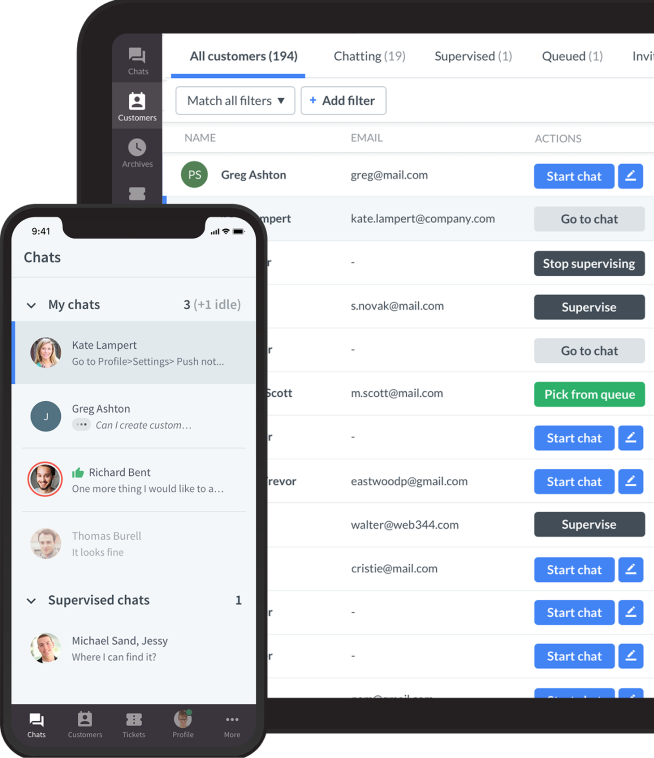


Live chat connects website visitors with a business through a real-time messaging tool. The visitor sends a message, the system passes it to an available agent or automation, and the reply appears in the same window. Depending on the setup, the conversation may start with a person, a chatbot, or an AI agent.
The technology is only one part of the experience. Your team also decides who answers, what happens outside business hours, and when a conversation needs a specialist.
What is live chat?
Live chat is a messaging channel that lets customers and businesses exchange messages in real time through a website or app. Visitors usually open a chat widget to ask a question. A human agent can respond directly, while some businesses use a chatbot or AI agent before offering human support.
Live chat describes the conversation; live chat software is the platform that delivers it. The customer sees a live chat widget, often as a small chat icon in the lower corner of a page. Support reps use a separate workspace to manage conversations, read incoming chats, and review customer context. In-app chat may use an embedded integration rather than the same website installation method.
How does live chat work? 6 steps
The simplest way to understand website live chat is to follow a message from the visitor to resolution.
Visitor → Chat widget → Available context / optional automation → Routing → Human or AI response → Resolution and saved conversation
1. A visitor opens the chat widget
A customer clicks the chat button and types a message to start a live chat conversation. A business may also show a proactive invitation, such as an offer to explain delivery options on a product page. The visitor can choose whether to engage.
Some businesses ask for a name, email address, or topic first. Keep any pre-chat form short: collect what the team needs to route or follow up on the request, rather than making every visitor complete a long questionnaire.
2. The software adds available context
The agent may see the page where the chat started, details the customer provided, and previous conversations that the system can associate with that customer. Connected tools may supply additional order or account information.
Context depends on the platform, its configuration, and how the visitor is identified.
3. Automation may handle a routine request
A rule-based chatbot can offer a menu or follow a predefined workflow. A knowledge-grounded AI agent can generate an answer using connected information, within the capabilities and permissions of the particular system.
This step is optional. A business can send visitors straight to a human, use automation only after hours, or automate selected topics. An order lookup needs an appropriate integration and identity checks; installing a chat widget alone does not enable it.
4. Routing assigns the conversation
When a person is needed, chat routing sends the conversation to the appropriate team or available agent. Depending on the software, rules may use a selected topic, language, page, or customer type.
If everyone is busy, the visitor may enter a queue or leave a message for later. Set expectations clearly instead of promising an immediate reply when no agent is available.
5. An agent replies in the same chat window
The agent reads the message, asks any necessary questions, and helps the customer. Saved replies can speed up common answers; conversation history can reduce repetition. If a specialist takes over, the handoff should include the issue and what has already been tried.
For example, the documented ChatBot.com integration with LiveChat supports configured transfers to human agents, and LiveChat's archives contain the full bot-and-agent conversation.
6. The conversation is resolved and recorded
The agent confirms the outcome or agrees on the next step. The platform can retain a transcript according to its settings, and the business may request a rating or arrange a follow-up.
A closed chat is not necessarily a solved problem. Record unresolved cases, assign ownership, and explain how the customer will hear back.
Is live chat a real person?
Sometimes. Traditional live chat connects you with a human agent, but a modern chat widget may begin with a chatbot or AI agent. The interface alone does not tell you who is answering.
Businesses should identify automated assistance clearly and offer a practical route to a person when the request requires one. If human agents are offline, the widget should explain the available options and expected follow-up rather than suggest someone is answering live.
Key features of live chat
Features are useful when they remove a specific obstacle in the conversation. Availability and limits vary by provider and plan.
Proactive chat invitations and automated greetings
Instead of waiting for visitors to ask for help, your chat widget can offer assistance based on configured conditions, such as the page being viewed or time on that page. A relevant welcome message can encourage customers to explain a problem they have not yet raised.
Keep the message specific and easy to dismiss. On a pricing page, “Need help comparing plans?” is more useful than repeatedly opening a generic greeting. Judge proactive messages by useful conversations and completed customer tasks, not just clicks.
Chat history and saved replies
One of the practical benefits of live chat software is a written record. Agents can review previous conversations when the system can identify the customer and the history is available. This makes follow-ups easier and can reduce repeated questions.
Canned responses are reusable answers to common questions, such as delivery times or password-reset steps. Agents should check the customer's situation before sending one and adjust the wording when necessary. A saved answer should support the conversation rather than replace listening.
Visitor tracking and personalized support
Many live chat tools display information relevant to the current conversation. In LiveChat, the Customer Details panel can include survey answers, visited pages, technology information, and data supplied by integrations or custom parameters.
An agent might use the current product page to clarify which item a shopper means. Check what your installation collects and what agents are authorized to see.
Chat routing and queue management
Nobody likes being bounced between departments. Use chat routing to reach the correct department: billing questions need people who can solve them, while sales questions need a team that understands the product.
LiveChat's documented routing rules can send visitors from selected pages or locations to agent groups. Its queue configuration places visitors in a queue when available agents reach their concurrent-chat limits; manual chat selection is another configuration option. These are configured behaviors, not a promise that software will understand and route every message automatically.
Privacy and access controls
Evaluate encryption, access permissions, retention settings, and the data passed to connected tools. Do not assume a conversation is visible only to one agent: authorized supervisors or teammates may also have access.
Do not ask customers to share passwords in chat. Direct payments and sensitive documents through the appropriate secure workflow. Review the provider's security documentation and your own setup before making privacy promises. Security features alone do not determine whether your deployment meets every applicable requirement.
Live chat vs. chatbot vs. AI agent
These terms describe different ways to answer a customer. They can operate within the same chat widget.
Question | Human live chat | Rule-based chatbot | Knowledge-grounded AI agent |
|---|---|---|---|
Who answers? | A support or sales representative | A programmed workflow | An AI system |
How are replies produced? | A person interprets the request and writes or adapts a reply | Menus, conditions, and prepared responses | Generated responses using instructions and connected knowledge |
Best use cases | Complex issues, judgment, exceptions, sensitive conversations | Structured FAQs, data collection, simple branching tasks | Routine questions expressed in varied language; supported retrieval or actions |
Availability | Depends on staffing and operating hours | Can operate outside staffed hours | Can operate outside staffed hours |
Complex queries | Can investigate and exercise judgment within authority | Limited to the designed flow | Depends on knowledge, tools, permissions, and reliability; escalation remains necessary |
Context and memory | Information available to the agent | Fields and state built into the flow | Context made available by the implementation; persistent memory is not guaranteed |
Human handoff | Transfer to a colleague or specialist | A configured transfer or contact step | A configured escalation route with context |
Role in the workflow | Resolve exceptions and relationship-sensitive requests | Guide predictable tasks | Handle suitable routine work and assist escalation |
“AI agent” does not guarantee that a tool can issue refunds, edit accounts, or make binding commitments. Each action requires the right integration, permissions, and controls.
Live chat examples: how businesses use it
The following examples illustrate possible workflows; they are not measured customer results.
Scenario | What happens in the chat | Why it helps |
|---|---|---|
Ecommerce: a shopper is unsure about sizing | An agent asks about fit and links to the relevant size guide | The shopper gets help with a specific purchase obstacle |
B2B SaaS: a prospect compares plans | The sales team clarifies team size and required capabilities | The prospect can evaluate suitability before choosing a plan |
Customer support: an order has not arrived | An authorized agent checks order details and explains the next action | The customer knows what will happen and who owns the case |
Onboarding: a new user is stuck | Support provides the next setup step and checks whether it worked | The conversation focuses on completing the task |
Lead qualification: a visitor requests a demo | A short flow collects relevant requirements and routes the request | Sales receives context without asking the visitor to start again |
AI and human support: a return falls outside standard policy | Automation explains the published policy, then passes the exception to a person | A human makes the judgment that the automated workflow cannot safely make |
For visitors wondering how to use live chat, start with the problem and the result you need. Include a relevant order or account reference only when requested through an appropriate process. Before leaving, confirm the next step and how any follow-up will reach you.
How live chat works behind the scenes
Embedding the chat widget
The website installation commonly starts with a JavaScript snippet or a CMS integration. The browser loads the widget and connects it to the messaging service. The service passes messages between the customer interface and the agent workspace.
Installation instructions vary. For LiveChat specifically, the manual installation guide says to copy the code from Settings → Channels → Website and place it before the closing </body> tag. Platforms such as WordPress also have documented integration options. Follow the selected provider's guide rather than treating one code placement as universal.
How messages reach the agent in real time
In LiveChat, WebSocket connections link the chat widget and agent application to the backend. When one side sends a message, the backend delivers the event to the other side. This keeps real-time conversations moving without customers refreshing the page. Registered webhooks can also notify integrations about messaging events. Developers can use APIs and SDKs when a workflow requires custom code. Source: LiveChat messaging architecture.
Live chat versus asynchronous messaging
Live chat is a simultaneous exchange; asynchronous messaging lets people reply at different times. LiveChat's optional Messaging Mode supports sending messages while the recipient is offline. This preserves a route for follow-up, but does not provide immediate support from a human. Explain whether the customer should stay in the window or expect a later response. Source: Messaging Mode documentation.
Handling multiple chats at once
Support agents can handle multiple conversations at the same time, using gaps between customer replies to move between threads. Agent workspaces help organize these conversations and flag new messages.
Concurrency is a capacity decision, not an unlimited productivity gain. Complex troubleshooting may demand one agent's full attention. Set limits based on task difficulty, wait times, and quality, and lower them if customers repeatedly have to prompt an agent for an answer.
Keeping the conversation connected
The service associates messages with a conversation so the visitor and team see the relevant thread. Reconnecting after a page change, identifying a returning customer, and retaining history depend on the implementation and settings. Test these behaviors rather than assuming they work identically on every device or channel.
How live chat integrates with other tools
A live chat platform is often part of a wider support workflow. Integrations can reduce manual copying, but the direction and depth of data sharing vary.
- Customer relationship management (CRM): associate a conversation with a contact or lead, log customer interactions, and make relevant account details available.
- Ecommerce integration: bring appropriate order or product context into the conversation, subject to access and identity checks.
- Help desk integration: assign work that needs investigation and continue the case after the live session.
- Knowledge base: help agents find approved answers or make self-service information available to visitors.
- Analytics: connect chat interactions with events such as purchases or registrations, using explicit tracking definitions.
Many live chat tools bring website chat, email, and supported messaging apps into a shared inbox. That does not automatically merge every customer identity or conversation into one thread. Check supported channels, history synchronization, attachments, and ownership rules. LiveChat's integration marketplace is a starting point for checking a specific connection.
Benefits of live chat for customer experience
Live chat support gives customers a way to ask for help while they are already using a website. For online stores, a clear answer about delivery or a product limitation can remove a purchase obstacle. For software businesses, real-time support can help with account setup or troubleshooting without scheduling phone calls.
Compared with phone support, written chat lets customers refer back to instructions while completing a task. Calls can still be better when a complicated issue needs a long explanation; choose the channel that helps resolve it.
Written conversations also give teams something to review. Recurring questions can reveal unclear website copy or a broken process. Saved replies and useful customer context can help agents respond faster, while escalation lets a specialist team member focus on cases that need investigation. Past conversations give that person a starting point.
Evaluate improvements using response time, resolution, customer effort, and customer satisfaction. For sales measurement, our live chat conversion guide explains how to distinguish chat-assisted purchases from incremental gains.
How to add live chat to a website
- Choose a defined starting use case. Decide whether the initial goal is support, product questions, or lead qualification, and identify the relevant pages.
- Set ownership and coverage. Assign the team, operating hours, escalation contacts, and an honest offline message.
- Install the widget. Use the provider's code or documented CMS integration. Check that it loads only where intended.
- Customize the experience. Match your brand, keep the opening message clear, and make the widget usable on mobile without covering essential controls.
- Configure the workflow. Set routing, short forms, saved replies, and any automation. Ask only for information needed for the request.
- Train and test. Run trial conversations, including a busy queue, a handoff, an offline request, and a returning visitor. Confirm that context and follow-up ownership survive each step.
- Launch and review. Start with a manageable scope, inspect transcripts, and adjust staffing and messages based on actual customer problems.
Effective training for your support team is crucial. Provide clear guidelines on response etiquette, software navigation, and common troubleshooting scenarios. Encourage role-playing exercises or mock live chat sessions to build confidence and efficiency. Prepare canned responses for frequently asked questions such as return policies, operating hours, or product information, and practice adapting them to the customer.
Personalize your widget to align with your website’s design. Customize colors to match your brand and choose a clear greeting such as “Hi! How can we help you today?” Keep the widget easy to spot without being intrusive. Before launch, check it on a small screen alongside your navigation, forms, and checkout controls.
Live chat best practices and common challenges
Match expectations to availability
Show clear business hours and a realistic response expectation. Outside those hours, offer the workflow you can support: an automated answer, a message for later, or another contact route. An offline form is useful only if someone owns the follow-up.
Give instant answers the right role
Online businesses can use approved answers for simple customer queries, such as opening hours or a published delivery policy. Instant access to that information can help customers continue their task. Account access problems, disputed charges, and urgent queries may require verification or specialist investigation instead.
Keep the human touch when a scripted answer fails: acknowledge the circumstances, explain what you can check, and take ownership. Frustrated customers need a useful next step more than another automated greeting. Use smart routing rules to reach an appropriate team, then track performance through resolution and feedback to see whether the workflow helps improve customer satisfaction.
Manage queues without sacrificing quality
Monitor waiting customers, abandoned requests, and agent workload. More simultaneous chats can shorten a queue while making each answer slower or less accurate. Adjust staffing or narrow proactive invitations before simply raising every agent's limit.
Preserve context during handoffs
Pass the customer's goal, relevant details, and attempted solutions to the next agent. Explain why the transfer is needed. A customer should not have to reconstruct the whole conversation because a different team takes over.
Set clear boundaries for automation
Use approved knowledge for routine answers and define escalation for uncertainty, repeated failure, sensitive requests, and actions outside the system's permissions. Test what happens when a visitor explicitly asks for a person. Measure successful resolution as well as human handoff rate; fewer transfers can hide unresolved problems.
Review a small set of operational metrics
Metric | What it helps you investigate |
|---|---|
First response time | How long customers wait for the first substantive answer |
Resolution time | How long it takes to solve the issue, not merely close a chat |
CSAT | How respondents rate their support experience |
Queue abandonment | Whether waiting customers leave before receiving help |
Human handoff rate | How often automation needs an agent, and why |
Repeat contact | Whether apparently resolved problems return |
Document your definitions. For example, an automatic acknowledgment should not be treated as equivalent to a useful human response when evaluating a staffed team.
How to choose live chat software
Choose live chat software that supports your customer workflow and team's capacity. During an evaluation, check installation, mobile usability, accessibility, routing, searchable history, saved replies, reporting, and the integrations you actually need.
Test an ordinary support request and a difficult exception. Can the customer reach the right person? Does the agent have enough context? Can the team follow up after the session ends?
Also compare support costs: seat charges, chat automation usage, integration fees, and staffing. The live chat cost guide explains how to build that total rather than comparing subscription prices alone.
Frequently asked questions
What does live chat mean?
Live chat means exchanging messages with a business in real time through a website or app. The term usually describes the channel; whether a human or automation answers depends on the setup.
How does live chat work on a website?
A widget connects the visitor's browser to a messaging service. The service routes messages to an agent or automation and returns replies in the same chat window. Availability and escalation depend on configuration.
Is live chat with a real person?
It can be. Human live chat provides real-time interaction with a person; other setups start with automation. Look for the responder's identification and the option to request human assistance.
What is the difference between live chat and a chatbot?
Human live chat involves a person answering in real time. A chatbot handles an automated conversation, often through rules or prepared flows. Both can appear in the same widget.
What is an AI agent in live chat?
It is an AI system that can answer questions using its instructions and available knowledge, and sometimes perform configured actions. Its reliability and authority depend on its implementation; it still needs an escalation path.
How do you add live chat to a website?
Use the provider's JavaScript code or a supported website integration, then configure the widget, team, hours, routing, and follow-up process. Test the complete experience before launch.
Can live chat work when agents are offline?
A chatbot may answer supported questions around the clock, or the widget can collect a message for later. Neither means a human is available immediately. The interface should make that distinction clear.
What information can a live chat agent see?
Depending on configuration, an agent may see your messages, submitted contact details, relevant browsing context, and connected customer records. Access varies by platform, permissions, and identity matching.
Put the workflow into practice
Start with one customer problem and build a reliable route from the first question to resolution. To test that workflow with LiveChat, follow the website installation guide and configure your team's coverage before inviting customers to chat.